Not changing direction, just stepping the game up
The first Apache Flex blog post is here:
If you follow me on twitter, you probably already know that, but it has been 2 months since I have left Obecto and started working at VMware Bulgaria.
This is a big change in my career and again it wasn’t that easy.
Working at Obecto was really cool! The people I have met there are very enthusiastic professionals and best at what they do. They are one of the Flex pioneers in Bulgaria, making great applications and as you know I am a Flex geek. I’ve learnt a lot working with guys like Todor and Vladi and all other colleagues. I had the opportunity to work on a big, unique and EXTREMELY interesting project, doing things that I am willing to bet no one had done with Flex. It was a pleasure working there and I am going to miss the atmosphere and the whole team. I can only wish them to continue with their passion making great projects and best of luck!

As I said it was fun, but I decided that it is time to move on. I cannot share a lot about my experiences so far at VMware, but I think it is great. I am still getting used working at such a large company with lots of colleagues and so much products and I am still getting confused sometimes with this “Inception thing” (VM inside of a VM) ::) Literally I am overwhelmed by information, but still want more. I like how I am constantly motivated to learn new things and be better. I also find it outstanding how developers are provoked to innovate and come up with new ideas, and how they are acknowledged.
A lot of things have happened these two months and I am so excited for the future, I am sure it will be interesting.
So what is next?
Be more awesome, of course! 🙂 I will continue with this blog and I will try to write interesting posts as before. I think now is a good time to say that this will continue to be my personal blog and will not represent thoughts and strategies of VMware
P.S. And since I am writing this when the hype is on whether Flex/Flash will live… I am sure there will be more mind-blowing websites and applications built with them.
I am happy to announce that I have successfully graduated the Faculty of Mathematics and Informatics at Sofia University “st. Kliment Ohridski” with bachelor’s degree in computer science.
You might ask, why I am so happy to write about that? The thing is that 4 years ago I graduated the Professional High School of Tourism in Sofia, with degree in hotel management. However even when I started studying there, my passion was in computers. The last 2 years in high school I had to study hard mathematics at home, and at private courses, because, as you might have guesses, at my high-school the level of math education was not that high. So with lots of hard work I was the only one from my school to be accepted at the Faculty of Mathematics and Informatics. And that was win No. 1
Win No. 2 – my bachelor degree, came even harder and tougher. Imagine the jokes that I received from some of my co-students, that had graduated high schools school with intensive learning of mathematics, and their belief that I will not be able to make it. Challenge accepted! That is why now the taste of success is even sweeter.
The whole thing that I am trying to say is that, these 4 years proved to me that nothing is impossible as long as you wish for it hard!
Now I am off to achieve the next big challenge!
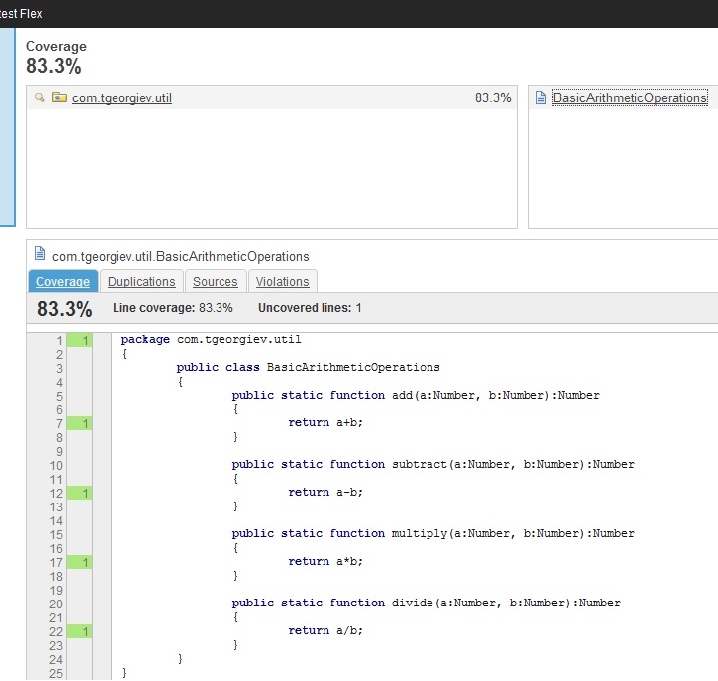
The great thing about running unit tests with FlexMojos 4 is that it can also generate code coverage report. See it here http://www.sonatype.com/people/2010/04/flex-test-coverage-kept-simple-with-flexmojos/
I just love that feature, because in the past you had to use a modified version of the Flex SDK with an external AIR Application to do that, but now it is very simplified.
I also love using Sonar to gather and display statistics for source code. I thought it would be great to build my project and run unit tests with FlexMojos and then reuse the reports created by it and show this information in Sonar. You are able to reuse the surefire reports using the flex plugin for Sonar, but however this was not possible for the cobertura coverage report . So what I did was to browse the code for this plugin and see how Olivier Gaudin and Evgeny Mandrikov, the guys written it, handle the surefire reports. And so I though that it was going to be easy using the code from the cobertura sonar plugin to implement this feature. And somehow I did.
I’ve added this patch in the Jira, so hopefully in the next version it will be included. Until the official version, you can use my modification (see bellow for download)
Here is how to use it. In your pom.xml you would have something like
<build>
<sourcedirectory>src</sourcedirectory>
<testsourcedirectory>test</testsourcedirectory>
<plugins>
<plugin>
<groupid>org.sonatype.flexmojos</groupid>
<artifactid>flexmojos-maven-plugin</artifactid>
<version>4.0-beta-5</version>
<extensions>true</extensions>
<dependencies>
<dependency>
<groupid>com.adobe.flex</groupid>
<artifactid>compiler</artifactid>
<version>4.1.0.16248</version>
<type>pom</type>
</dependency>
</dependencies>
<configuration>
<sourcefile>TestSonar.mxml</sourcefile>
<flashplayercommand>C:\FlashPlayer\FlashPlayer.exe</flashplayercommand>
<coverage>true</coverage>
<coveragereportformat>
<param>xml <!-- param-->
</coveragereportformat>
<testfailureignore>true</testfailureignore>
</configuration>
</plugin>
</plugins>
</build>
That snippet would build and test your project. Important here is to specify coverage and coverageReportFormat . The coverageReportFormat is xml, so it can be used later on.
And the properties in the pom.xml for the sonar plugin are
<properties>
<sonar.language>flex</sonar.language>
<sonar.dynamicanalysis>reuseReports</sonar.dynamicanalysis>
<sonar.surefire.reportspath>target\surefire-reports</sonar.surefire.reportspath>
<sonar.cobertura.reportpath>target\coverage\coverage.xml</sonar.cobertura.reportpath>
</properties>
I think everything here is understandable, you specify to use the plugin for flex and reuse the generated reports for surefire and cobertura.
See the full pom.xml here
And to build all up run:
mvn clean install sonar:sonar -Pflex
Have in mind that you should use maven 3 for FlexMojos 4
See the result
So if you can’t wait to try this out, get this patched version, if not you could probably wait for an official release, I hope there will be one soon.
Download the patched version of flex plugin for sonar from here. (Again, this is my modification of the original version, it is not the version provided by Codehaus, Sonar)
Download the test Flex project with Unit tests from here
Bad code leads to bugs, hard understanding, hard maintenance. We should really learn to write good code, and with so much open source tools for code analysis we could improve it one step higher.
Sonar is a tool for code quality analysis. It helps improving software quality using static analysis tools. It targets Java code, but there are plugins for Flex, C, PHP, .Net and other languages. The Flex plug-in specifically uses FlexPMD, FlexMetrics, FlexCPD and FlexMojos.
In this post I will show you the features that FlexPMD gives us within Sonar. I think that this tool is not really known by the Flex developers, I admit that I also didn’t have an idea what it is until recently.
Have you used eclipse for Java developing? I really love when warnings like unused variables and not called methods appear. Well FlexPMD does this for us along with a lot more things. It even can be used inside of Eclipse to show you live reports. There are defined rules that FlexPMD follows to catch issues in the code and bad practices. Great thing is that you can also define your own rules using this flex app
Step 1. So first go and download Sonar. After that download the flex plugin for it. It is a jar file. Now extract the contents of the sonar archive in a desired location, and place the sonar-flex-plugin-x.x.x.jar in extensions\plugins directory of sonar. That’s pretty much what you need to start sonar. By default it uses an embeded Apache Derby database, that you can change to whatever you want in sonar.properties file in conf folder. So now start Sonar. I start it from bin\windows-x86-32\StartSonar.bat as I am a windows user, if you are on other operating system start it from bin\YOUR_SYSTEM\sonar.sh. Have in mind that it takes a while to start so have patience. To assure that it is started open a browser and navigate to http://localhost:9000/
Step 2. Create a flex project. I will create a small test project with one class written really ugly and bad and doesn’t actually do a thing it is here to show you what errors Sonar will find. Pff It doesn’t even deserve to be put it in a code tag and to be styled because I am embarrassed of it 🙂
Here it is:
public class MyTestComponent extends UIComponent
{
private var r:Number;
private var variableNotUsed:Object;
override protected function updateDisplayList(unscaledWidth:Number, unscaledHeight:Number):void
{
r = Math.random()* 85;
var child1:UIComponent = new UIComponent();
addChild(child1);
}
public function myFunctionWithVeryLongNameAndLotsOfParametersThatDoesNothing(p1:String, p2:Number, p3:Object, p4:Boolean, p5:int, p6:*, p7:Array):void
{
return;
}
}
Step 3. Run analysis built with Maven. For this step you should have Maven 2 on your computer (I think Maven 3 will also work, but I have tested it with 2). Note A lot of Flex developers think of Maven as the Black ninja, Java developers use for their projects. Maven is a tool that helps managing the building, documentation, testing and reporting for Java projects. With FlexMojos you can even use it for your Flex projects also. It is a lot useful for continuous integration. So my note to the Flex developers: don’t be afraid of Maven, it is here to help us 🙂
Assuming that you have Maven on your computer, as the documentation on the sonar site suggests, add
<profile>
<id>flex</id>
<pluginrepositories>
<pluginrepository>
<id>flexpmd.opensource.adobe</id>
<releases>
<enabled>true</enabled>
</releases>
<snapshots>
<enabled>false</enabled>
</snapshots>
<name>FlexPMD repository on opensource.adobe.com</name>
<url>http://opensource.adobe.com/svn/opensource/flexpmd/maven-repository/release/</url>
</pluginrepository>
</pluginrepositories>
</profile>
this to the settings.xml file of maven located either in $M2_HOME/conf/settings.xml or ${user.home}/.m2/settings.xml
And now in the flex project folder add a new file named pom.xml
<project xmlns:xsi="http://www.w3.org/2001/XMLSchema-instance" xmlns="http://maven.apache.org/POM/4.0.0" xsi:schemalocation="http://maven.apache.org/POM/4.0.0 http://maven.apache.org/xsd/maven-4.0.0.xsd">
<modelversion>4.0.0</modelversion>
<name>Test Sonar Project</name>
<groupid>com.tgeorgiev</groupid>
<artifactid>sonar.test</artifactid>
<version>0.1</version>
<packaging>pom</packaging>
<build>
<sourcedirectory>src</sourcedirectory>
</build>
<properties>
<sonar.language>flex</sonar.language>
<sonar.dynamicanalysis>false</sonar.dynamicanalysis>
</properties>
</project>
Now open a console, navigate to the location of your flex project and type “mvn sonar:sonar -Pflex”.
Step 4. After some time of downloading the needed jars for the build and running the analysis task we can check what happened when we open http://localhost:9000/ There should be displayed our project with all the violations that were detected.
For my test project I have
Blocker 12
Critical 0
Major 9
Minor 0
Info 1
And when I select to see the Blocker issues for example I see:
Hmm strange, but it found most of the issues I think are present in this code 🙂
So tell me, do you use Sonar for static analysis of the code, or maybe some other tool? And I’m really interested on how do you use it? Did you integrated it in continuous build or do you check the code once in a while on your computer? Do you use it individually or your whole team uses it.